LAN Consolefrom WISPHero

A browser for the gear on your network

LAN Console is a desktop browser for WISP and network teams. Type a radio's address and its page opens. A dashboard shows what UISP knows about your network, so problems are easy to spot.

Your connection is not private Not on addresses in your own ranges.

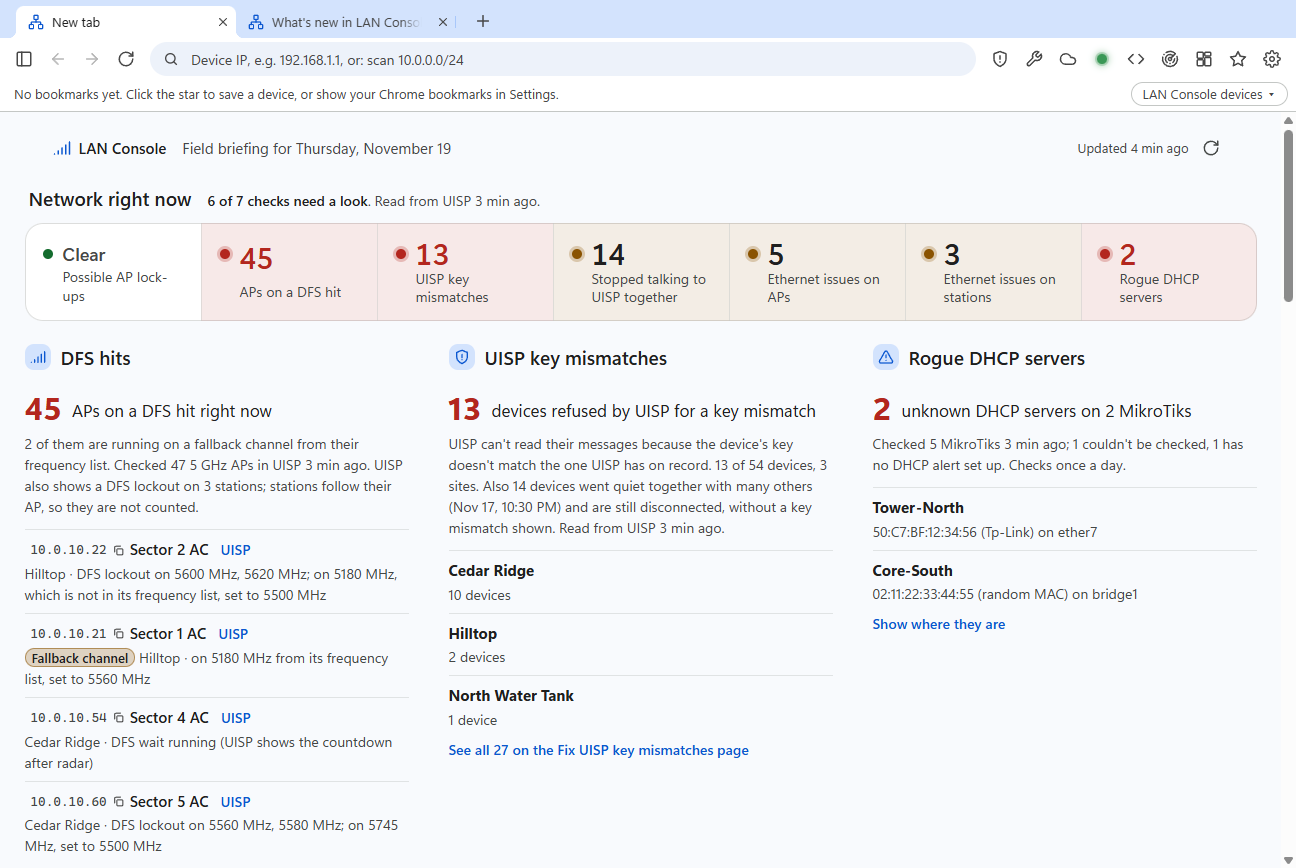
The LAN Console dashboard. A row of checks across the top reads: possible AP lock-ups clear, 45 APs on a DFS hit, 13 UISP key mismatches, 14 devices that stopped talking to UISP together, 5 APs and 3 stations with Ethernet issues, 2 rogue DHCP servers. Below are the DFS hits, key mismatches and rogue DHCP servers in detail.
The new-tab page. Every check from UISP sits in one row at the top, with the details below. Screenshots show a made-up demo network.

What UISP knows, without digging for it

Give LAN Console a read-only UISP API token and it reads your device lists every 30 minutes while a dashboard is open. The checks below run on that list. LAN Console doesn't change anything in UISP unless you click a button that says so.

DFS hits, and which APs are on their fallback channel

LAN Console lists every 5 GHz AP that UISP shows on a DFS lockout, running a DFS countdown, or sitting on a different channel from the one it's set to. It counts APs only: stations follow their AP.

When an AP has moved to a channel from its own frequency list, it says so, with the channel it moved to and the one it's set to. Each row has the AP's address, a copy button, and a link that opens the radio through UISP's own sign-in.
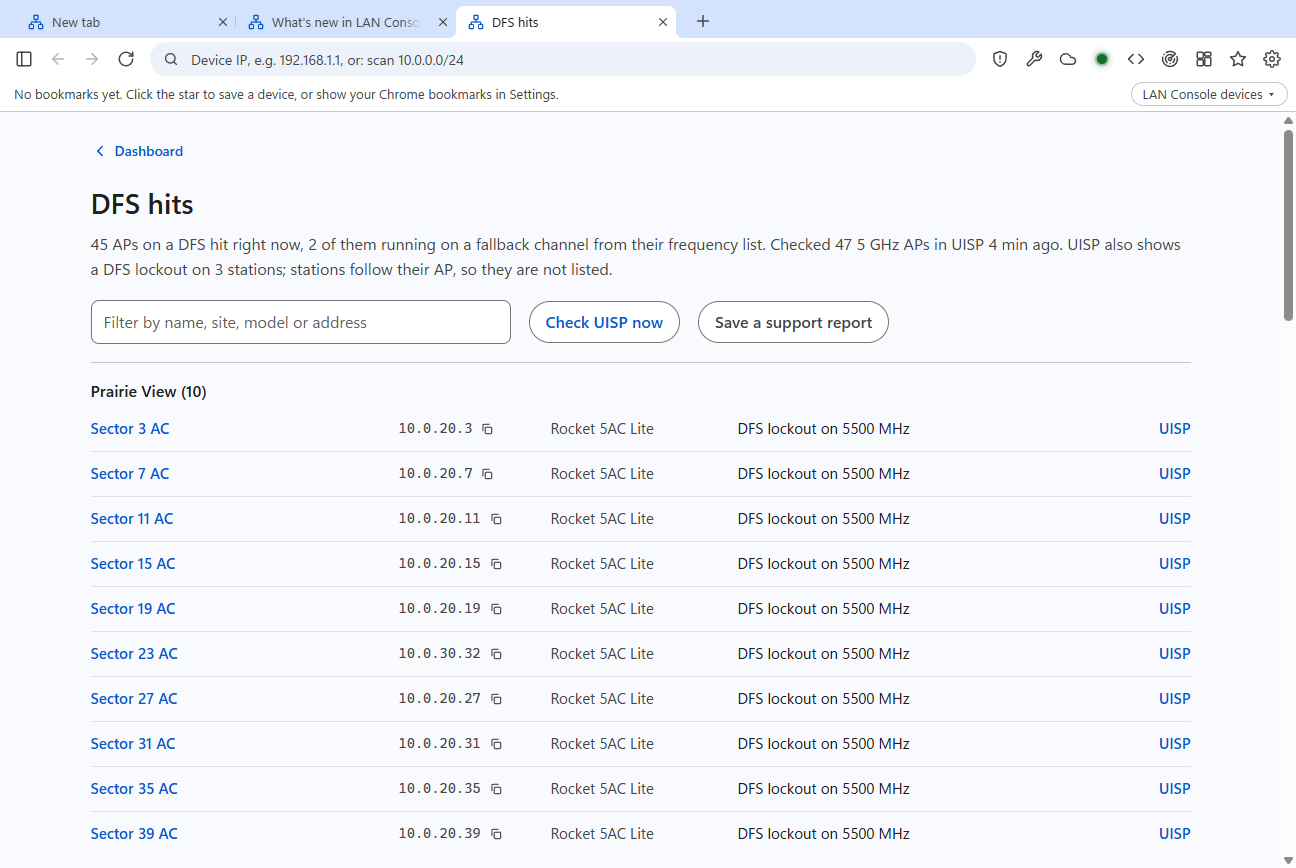
The DFS hits page: 45 APs on a DFS hit grouped by site, each row with the AP name, its address with a copy button, the model, the reason such as DFS lockout on 5500 MHz, and a UISP link.

Ethernet problems on LAN0

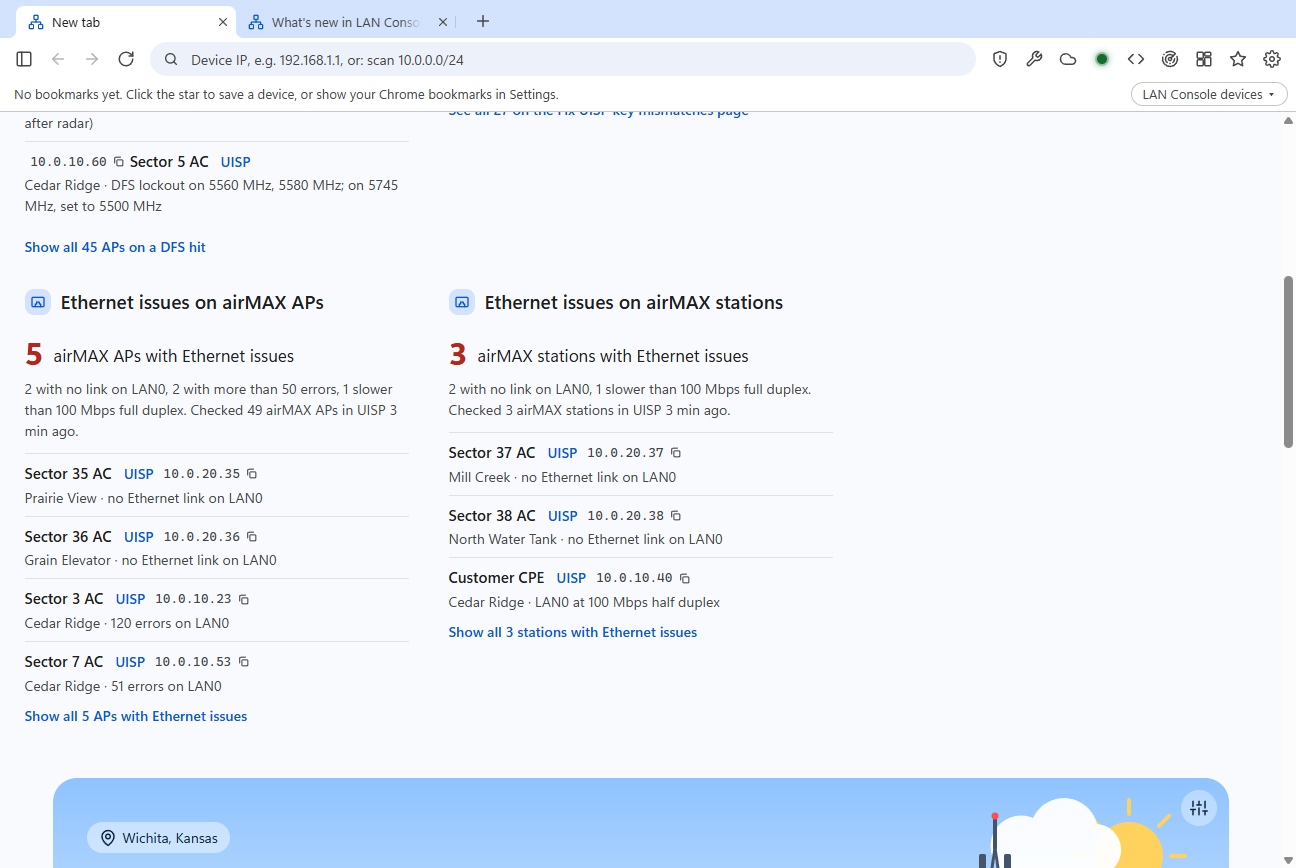
Separate lists for airMAX APs and stations:

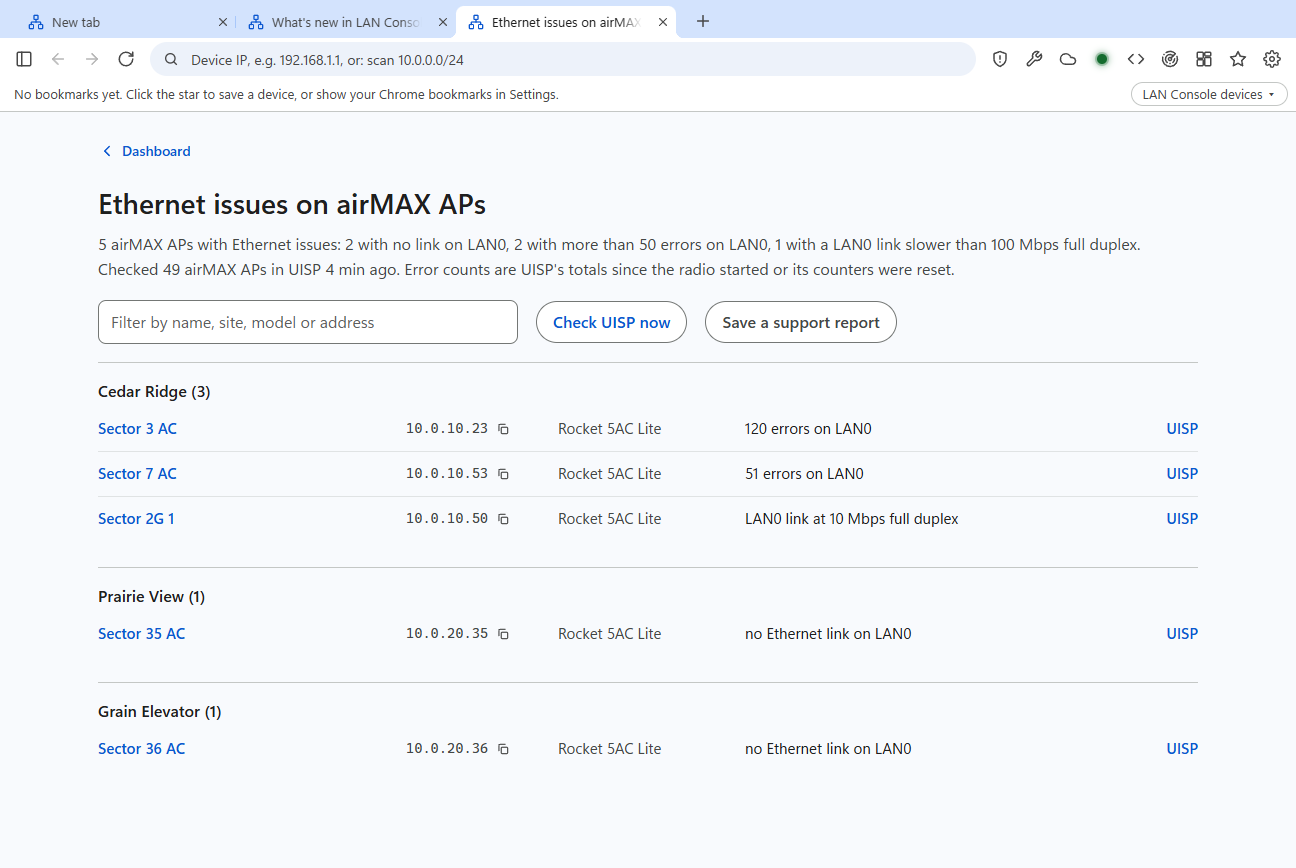
  • no Ethernet link on LAN0 while the radio is up
  • more than 50 errors on LAN0
  • a link slower than 100 Mbps, or half duplex

Another check flags airMAX APs whose wireless interface ath1 reads disconnected while the AP is up: a possible lock-up that needs a look.

The Ethernet issues page for airMAX APs: rows for 120 errors on LAN0, 51 errors on LAN0, a LAN0 link at 10 Mbps full duplex, and two APs with no Ethernet link on LAN0.

Fix UISP key mismatches in bulk

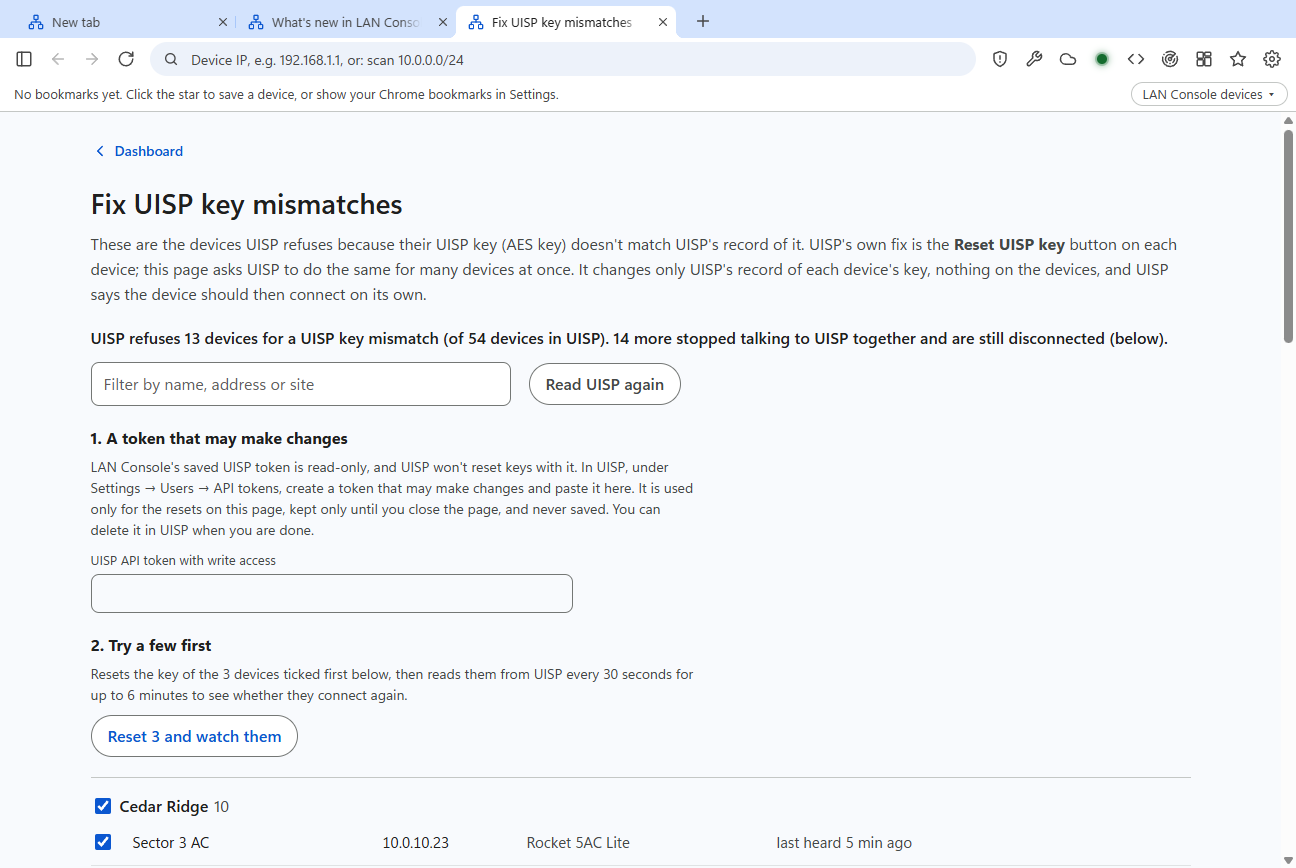
After a UISP move or upgrade, devices can be refused because their key no longer matches. UISP's fix is the Reset UISP key button, one device at a time. LAN Console finds every refused device and does the same reset for many at once.

It resets three first and watches whether they come back before you do the rest. It also spots devices that went quiet together at the same moment, a pattern a single device page doesn't show. The token that allows the reset is kept only while the page is open.

The Fix UISP key mismatches page: 13 devices refused by UISP, a field for an API token with write access, a Reset 3 and watch them button, and the devices grouped by site with tick boxes.
New, not yet tested on real routers

Rogue DHCP servers on your MikroTiks

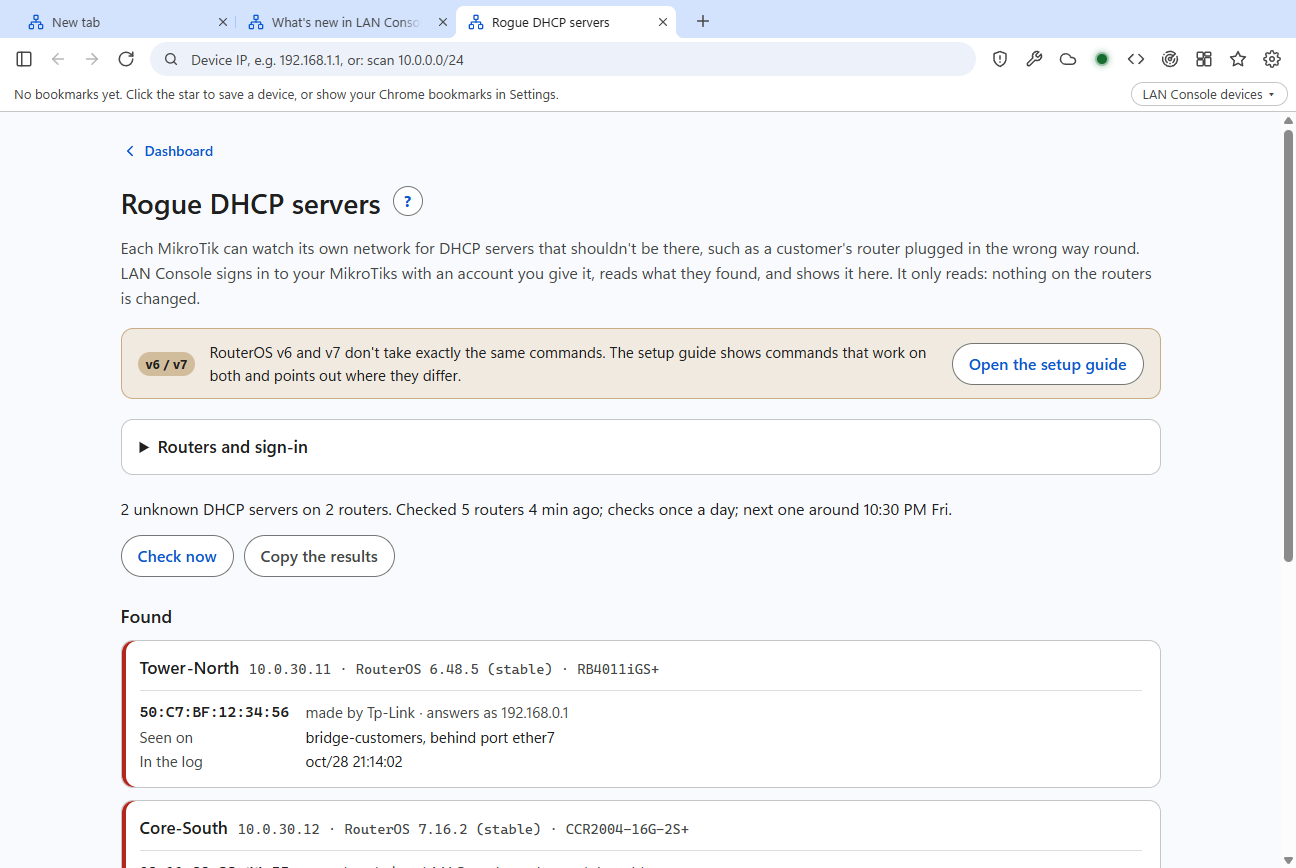
A customer plugs their router in the wrong way round and starts handing out addresses. RouterOS can watch for that with its DHCP alert. LAN Console reads those alerts from your MikroTiks once a day with a read-only account, and shows which router saw it, the MAC address, who made the device, and the port behind it.

A setup guide gives the RouterOS v6 and v7 commands. LAN Console only reads; it never changes a router.

The Rogue DHCP servers page: 2 unknown DHCP servers found on 2 routers. One card shows a TP-Link device seen on bridge-customers behind port ether7, with the time from the router's log.

When UISP itself is the problem

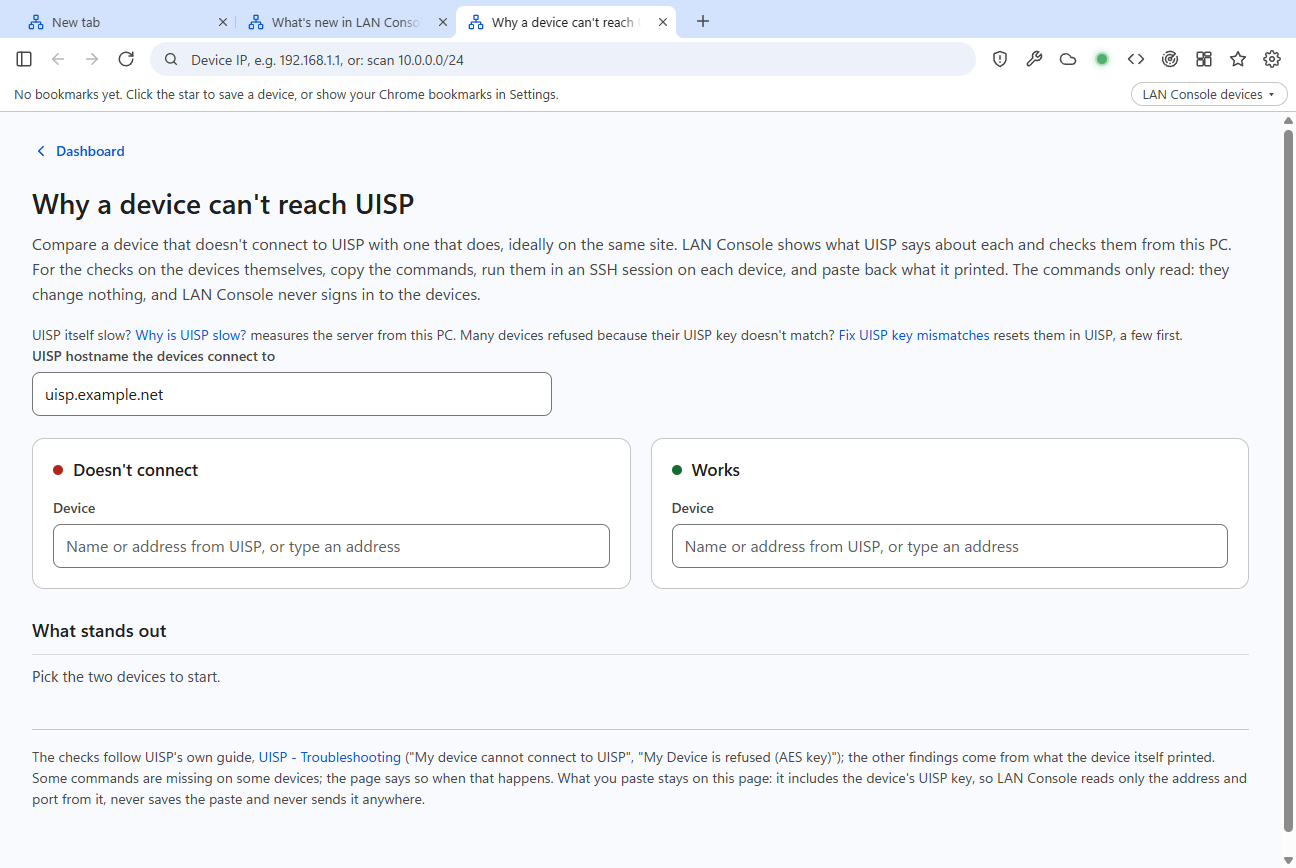
Why a device can't reach UISP compares a device that connects with one that doesn't. It shows what UISP says about each and gives you read-only commands to paste into the radio. Then it reads back the output and points at the difference: DNS, packet loss, the clock or the key.

Why is UISP slow? measures the server from your PC for two minutes and tells you whether the time goes to the network or to UISP.

The Why a device can't reach UISP page: the UISP hostname, a Doesn't connect side and a Works side to pick a device for each, and a What stands out section.

Built for device web pages

Radios and routers use self-signed certificates, old TLS and odd ports. Everyday browsers fight them at every step; LAN Console expects them.

No certificate warnings on your ranges

Addresses in private and VPN ranges, plus any ranges you add, open without the warning page. The first certificate a device shows is remembered. If it changes later, LAN Console asks before trusting the new one.

Old firmware still opens

Some devices only speak TLS 1.0 or 1.1, which Chromium no longer supports at all. LAN Console relays those pages through a local connection on your PC, so they open anyway.

Sign in through UISP

Radio links from the dashboard go through UISP's own device sign-in, the same as clicking the address in UISP. Open twenty radios in background tabs and each one signs in without you watching it.

Faster the second time

airMAX radios send the same large script files. LAN Console stores identical files once, encrypted, and only after two different radios sent the same contents. Opening a radio went from 5.5 seconds to under a second on our network.

Reloads when the device is back

Reboot a radio from its own page and LAN Console pings it until the web page answers again, then reloads the tab.

Firmware with known security holes

For MikroTik, airOS, UniFi, Cisco IOS and TP-Link Omada, LAN Console reads the firmware version and checks it against the US National Vulnerability Database and CISA's list of exploited vulnerabilities.

Everything else

A field briefing every morning

The dashboard says whether today is safe for tower climbs, from National Weather Service forecasts and Storm Prediction Center outlooks. Thunder means no. Wind limits are your own company's, set with a slider. Below that: security advisories and new firmware from the vendors WISPs use, busy forum threads, and upcoming industry events.

The dashboard's weather briefing for Wichita, Kansas: climbs and installs are fine, with care, gusts to 21 mph, with a seven-day strip and a list of security advisories.

Reach a device on its factory-default address

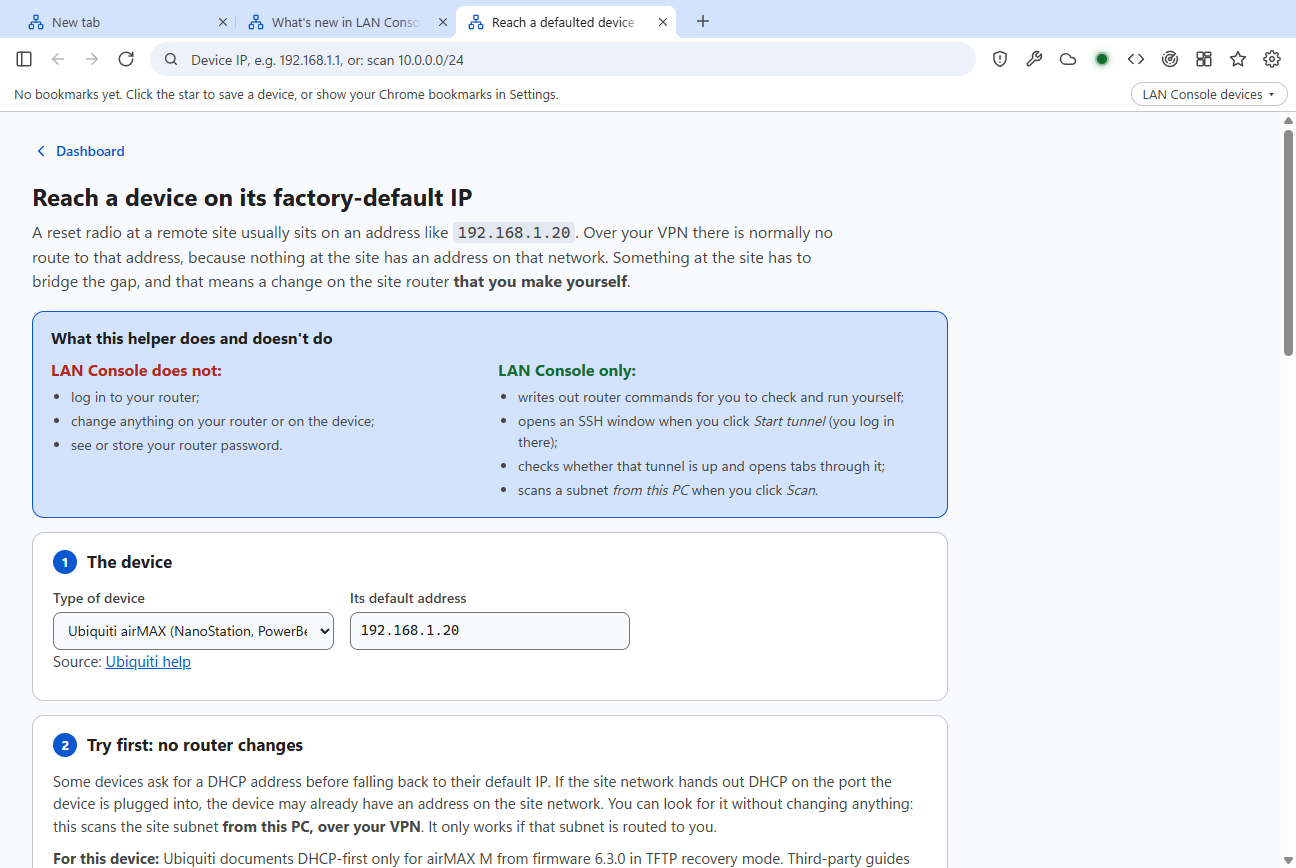
A reset radio at a remote site sits on 192.168.1.20 with no route to it. The Reach helper writes the router commands to get there, through a temporary address, an SSH tunnel or a port forward, plus the commands to undo it. You run them yourself: LAN Console never signs in to your router.

The Reach helper: a box listing what LAN Console does and doesn't do, then step 1 with the device type and its default address 192.168.1.20.

API and developer tools

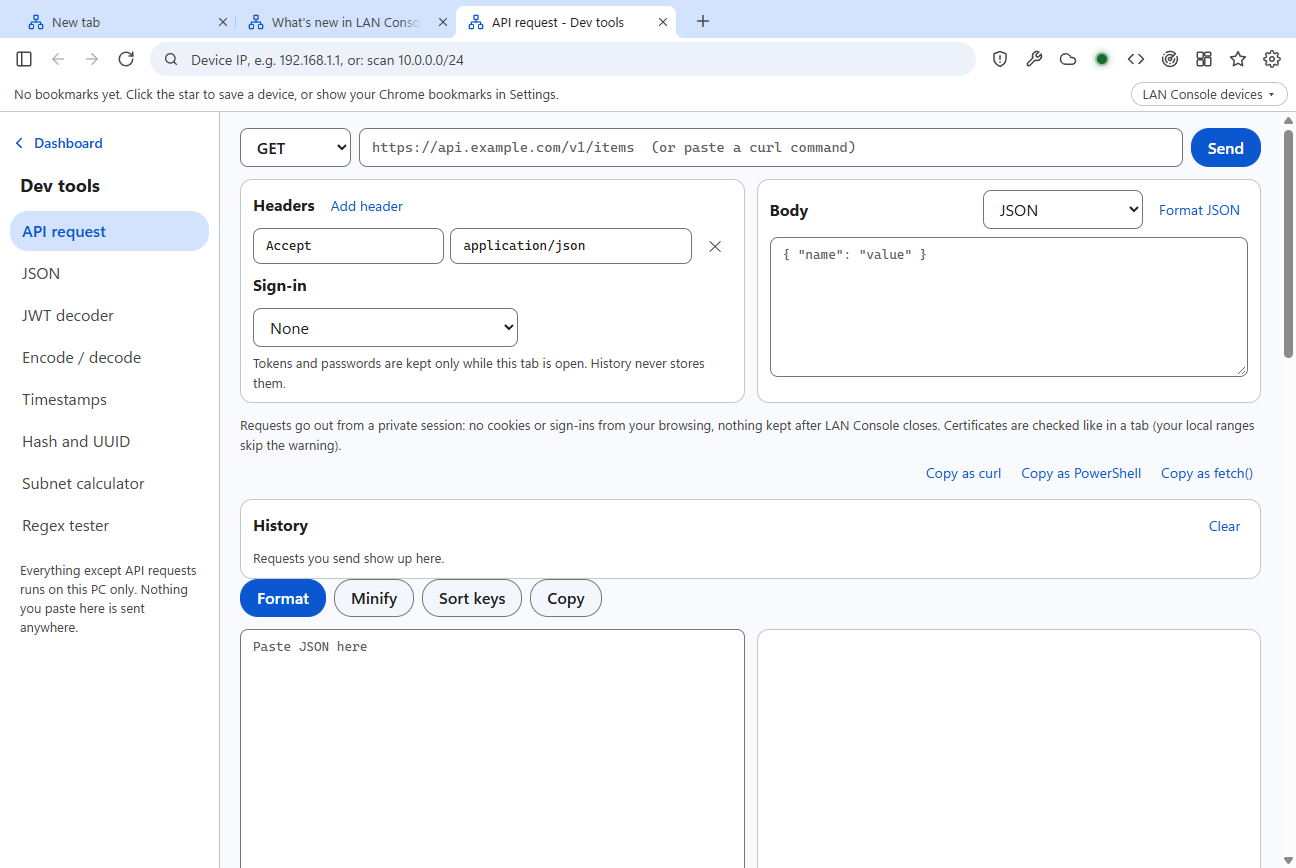
Send API requests with headers and sign-in, paste a curl command to load it, and copy the request back as curl, PowerShell or fetch. There's also a JSON formatter, a JWT decoder, a subnet calculator and a regex tester. JSON pages open as a tree you can fold.

The API and dev tools page with a request bar, headers, a JSON body, history and a JSON formatter.

Scan a subnet

Ping sweep, Ubiquiti and MikroTik discovery, SNMP, web titles and SSH banners, with device names from UISP and your bookmarks.

Saved passwords, locked if you want

Logins are encrypted by Windows or macOS. An optional master password locks them, with a recovery code and export to another PC. The Default login is never filled in automatically.

Window layouts

Save a set of windows and tabs and bring it back with one click, or tidy the open windows into corners, side by side or a cascade.

Your Chrome bookmarks and cloud consoles

Show the bookmarks bar from a Chrome profile, and open UISP, UniFi, Meraki, Omada, cnMaestro, Tarana and other cloud consoles from one menu.

Ask several AIs at once

Type a question in the address bar and ask ChatGPT and Gemini side by side, with Claude and Grok as options, signed in with your own accounts.

Open in LAN Console from Chrome

A small Chrome extension adds "Open link in LAN Console" to the right-click menu, for UISP alert links that arrive in Gmail.

What LAN Console isn't

It's a tool for network work. Keep using Chrome or Edge for everything else.

Not your everyday browser

  • Don't use it for banking, payments or personal accounts. It's built by one person with AI coding tools, and hasn't had the security review a mainstream browser gets.
  • Google accounts don't sign in. Google blocks sign-in from embedded browsers, so Gmail and Google sign-in open in Chrome instead.
  • No automatic updates yet. Security fixes from Chromium arrive when a new LAN Console version is installed.

Still being proven

  • Beta. Several checks were built from UISP's and MikroTik's documentation and tried only against test servers. The rogue DHCP check and the AP lock-up check haven't run on real gear yet.
  • Windows 10 and 11. The Mac version (macOS 13 or later) is an early test build.
  • Not code-signed yet, so Windows and macOS warn on first install.

How to get it

LAN Console

LAN Console is in beta with a small group of WISP teams and isn't available for download yet. If you run a WISP and want to try it, email us.

Ask to join the beta

The Chrome extension

"Open in LAN Console" is waiting for review on the Chrome Web Store. It needs LAN Console installed on the same computer, and it collects nothing: see the privacy policy.